Showing posts with label computing. Show all posts

Monday, July 14, 2025

Hot changes ahead


Phew it's been a very hot weekend with my head feeling rather like it's been baked despite keeping in the shade and drinking a lot of fluids as really when you run hot like me you really don't do warm although as I type this, the Steak pie is in the oven.

I also can see something going out to the junk pile as a 2019 Chromebook is having major dns and remembering  connections issues as it drops out of sites that you elect to stay logged into and lose connection.

I suppose you can look at that as a incentive to rationalize the machines as there are limits to just how many you really do need around and just transfer over to memory sticks the pictures linked to each internal account as they are the only things that matter as thanks to Google passwords and log in stuff is shared across different machines via the Google Account.

For lap usage I prefer the track pad rather than trying to balance machine on lp with mouse and mat somewhere within arms reach to do things as much as with Windows machines Mouse can be less likely to overshoot.

At least my renewed cds do sound great through the system apart from looking just fantastic in their replica sleeves.

Monday, March 17, 2025

Mid mad march entry

Moving towards the middle of the month and plans are being made for a short trip away at the end of the month while spring is definitely in full effect with lots of things coming up such as catkins and daffodils and small birds such as robins being about.

Interestingly since the week before and the period after Camp I have been getting up a good deal earlier  by at least a good hour which isn't just a matter of things such as bright mornings although at the end of the month that finger turning ritual of setting every clock and watch to Daylight Saving aka British Summer Time Begins where we kid ourselves the night is so much brighter.

It's not a trick I fall for but when official time is altered you can't live as if it hasn't really as transport goes to it - railways being what moved the UK to a standardized time in the first place - and shows on the radio and tv are listed to that too.

No it's something that has been talked about in the context of high school children,  namely the tendency to check before bed and then having taken a device to bed to start waking up around three and rationalize looking around the likes of news sites saying I'll just have a quick look and soon a few hours goes by and maybe you crash to sleep.

Then you wake up quite a bit later as you've hit deep sleep later than you would of so you start the day late having had less sleep.

Given my spoon issues anyway it's not good so I'm keeping the electrics downstairs at night.

Perhaps I need old school parenting?


Monday, December 9, 2024

Replacing ones Chromebook

Friday it must be said wasn't a good day beyond even the mini tornado we had in the morning tearing up trees and blocking roads off.

I had problems with one cellphone sim provider, a laptop that died as the gales raged around me with no prior warning and the trackbar went on my Chromebook. Trying to control it with a mouse on your lap isn't so easy.

That the three things in a day your mothers always caution you of saying the pattern to be complete before things can get better

So after sorting out the laptop - ordered from the supplier of the last one a good decade ago - we got on to the task of looking for a brand new chromebook maybe something a bit beyond the basic educational models.


I found an Asus Cx3402CB with an interesting back story of being bought, opened once only for owner to find it wasn't a Windows notebook that seemingly he wanted (I wouldn't get one unless it was a fully spec'd and featured laptop).

This one he was selling this which had everything a Chromebook Plus had outside of the AI I was less bothered about such as 8gb of ram to fight sites like Tumblr and Reddit with with their ridiculously massive continuous feeds of photographs each far bigger than the screen needs to display clearly really driving your hardware trying to keep it all loading smoothly and some 256gb of solid state memory.

It is a bit bigger too, 14 inches rather than the usual 11  to 12.5 inch which helps the peepers read the text with less eyestrain.


It was all there with less than one hour use, wiped, for a massive discount and setting up is as easy as entering your Wifi stuff,  adding your account and you're done.

Another advantage of being bigger is a bit more space between the keys so it helps cross that rubicon between Chromebook and MacOs or Windows 11 when it comes to productivity and the bigger screen helps when using things like Pixlr to edit pictures with or working with Google Docs

We'll see how this unexpected pre-christmas present works out.

Monday, March 27, 2023

New Chromebook is finally here

Drama, eh?

The long story of how my pre-covid Chromebook having given up the ghost a few weeks back would of been simple for losing permanently its Wifi facilities and of being replaced in a few days other than for the seller of a new machine taking the money and NOT sending and NOT even responding to messages about when it coming.

In the end I called in CatBay tm and had them make me a full refund but that took near enough two weeks.

I had an idea around how my refund attempt was going so ordered up another while that was going through due process so within two working days of getting a refund I actually get one.

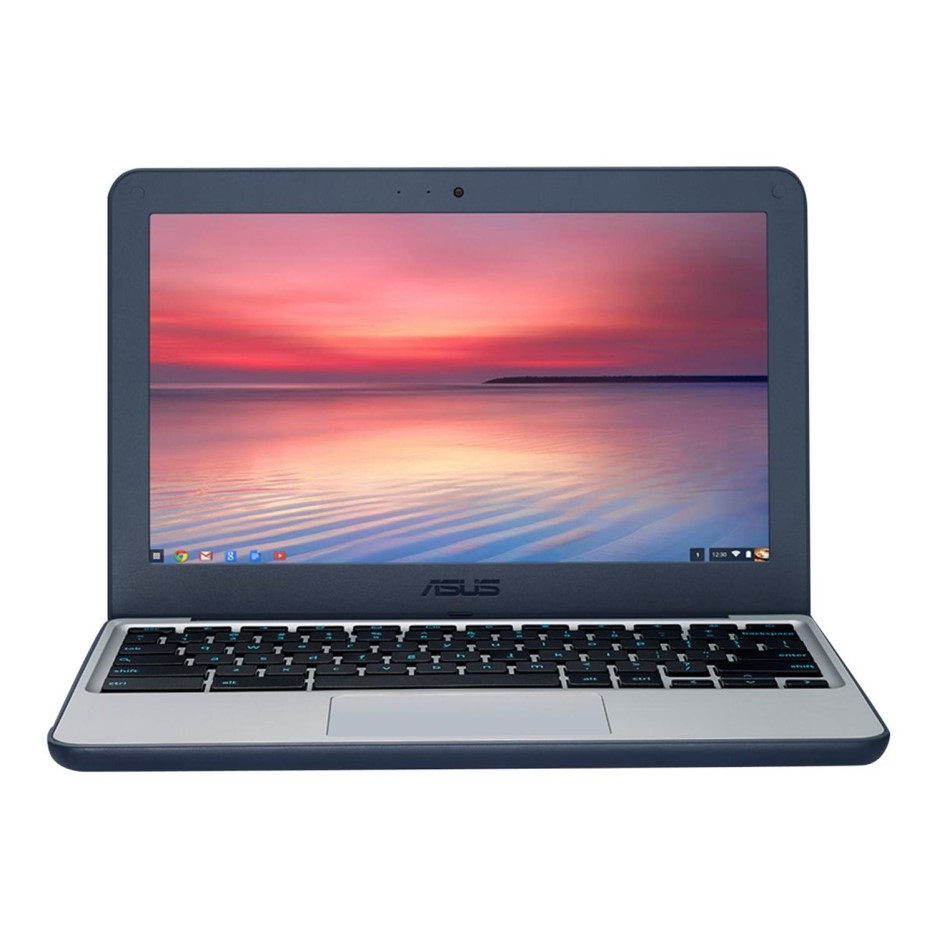
The vendor double box wrapped it and removing the outer box you get this, the Asus C214M which is plain jane flip top Chromebook designed for children at school really so totally appropriate for me!
Compared with my original Asus C202, this is a fair bit slimmer which suggests a from the ground up reworking of case and motherboard rather than a rebranding of the previous model.

Like that it is an 11.6inch screen which I find handy for being small enough to easily use anywhere while the text isn't too small to read without eyestrain.

One the ways that was achieved is obvious from this side which is the Expandable external memory in the form of a SD card you insert has been changed from the full sized version to a Micro SD card popular in smartphones and portable digital music players.

That means if you had anything on a full sized card you need to transfer that over to the new one.
Another difference is on the top right above the keys. The power switch has been removed from the top to the side although it still the case it opens up and comes into life.

Getting going is child's play really.

If you don't have a google account, and if you have an andriod smartphone with various things on it most likely do after adding your Wifi network by selecting it and adding the password, you enter the details and you are into that account.

It even puts up the account holders username and any avatar!

Your passwords for sites are securely stored unless you've opted otherwise in that accord so getting to GMail and all your favourite sites is actually quite easy


In the box is the get you going instructions and charger which is a USB-C type that goes into the top right slot on the side where the C202 had a conventional mini jack and while it has a blue tooth option, 3.5mm headphone jacks are supported

While I could easily of done without the issues in getting a replacement, this Chromebook is working well, being responsive on Tumblr feeds and a breeze for quickly doing everyday tasks that don't require locally stored programs to be installed and many apps help take this beyond Tablet territory for functionality with full decent keyboard plus touch capabilities should you need it.

Colour me impressed. 

Monday, December 14, 2020

The Fiio X1 Mk II

We are almost ready for Christmas with appoint fixed with the Fur Cutter tomorrow to get that under way and the stuff I need for other peoples Christmas here.


I've been recently road testing a small thin digital audio player as mine are a few year old and a bit chunky.

This, the Fiio X1 mkii is thinner than my original X1 and has a different rotary encoder to move though the menus such as songs, artist, folders, albums, playback settings and system set up.

It is more positive than the original X1 but as it uses touch it can and does overshoot at times so it's often easier to use the << and >> buttons to navigate.

The output socket, micro sd card slot (it has no internal memory) and micro usb fit at the bottom of the unit.

The display is a basic 320x240 but adequate and can be turned off by one light press of the power button on the side while the output can be switched from headphones to a line out for  stereo system or portable headphone amplifier such as Fiio also make as some headphones do need more output than many devices natively can provide.

The line output has a number of built in level adjustments you can apply that can help if the output is such you can hardly turn up the volume without it being too loud which is sensible.

This handles all the major audio file formats such as Flac, Apple's Alac, Aac and the evergreen Mp3 but the one issue that there doesn't seem a cure for is sometimes it doesn't do gapless replay correct putting even a tiny space in or a click sound which may be a distraction on music that has lots of parts that segue into each other such as things by the Pink Floyd or live concerts although it isn't as bad as my old Sensa Clip+ used to be in 2010 for it.

Unfortunately there hasn't been any new software updates that may of cured that.

It's fine for playing compilations or most studio albums where it does sound very good for the money but not a first choice for prog rock or live rock concerts where its gap issues do take the edge of seamless songs.

Monday, August 12, 2019

Things to do on a rainy day

As I write this, it's really been something of a damp squid of a weekend with very heavy rain, power issues in parts of the country and no good for being out of doors which as I said the other week is really more my thing.
Instead I've been otherwise engaged with more mundane things such as sorting out bookmarks on the Chromebook because my bookmarks go back at around 2006/7 being imported from machine to machine regardless of browser over that period.
Sometimes it can be good for finding a old post about something I recall particularly if it has some otherwise hard to find information in it.
On the other hand you may draw a blank because either the site no longer exists like Google + or it's a persons blog on a site that has been removed or they shut down such as on Tumblr and so serves no real purpose.
The great thing about Google Accounts is being synchronized it doesn't matter on what you view on, all things like bookmarks and password changes are all saved across the board so I thought it was a good use of time this weekend.
One thing you can do is still life photography of either objects like coins, models or like this, flowers.
I also listened to a few recordings I hadn't played in a while while I wait for some new old titles to slowly come in being ordered from various separate suppliers.
 

Monday, June 24, 2019

JoBook 2

As mentioned at Furry Story Time, I had been experiencing  computer problems and needed borrow another machine temporarily.
In the beginning there was the JoBook tm that arrived around September 16, 2016 which a kind of replacement for a Netbook that was incredibly slow on busy sites such as Tumblr and in any event had died totally.
That chromebook, a Lenovo N22 that had over the years had the ability  to use Google Apps supplemented by Android ones had been performing well being used to check emails with, use on Tumblr, FA, the IK chat and Lil Jennies story time  seemed to develop a fault that left it with static lines flying across the screen.
Thus I really needed to get a replacement organized for it as it used rather a lot.


This is JoBook 2 a Asus C202sa gj0027 which like the original is a 11.6 inch screen with a unspectacular but adequate 1366 x 768 resolution which is fine for general usage or watching anything from the BBC iPlayer on.
It has 16gb of memory but that's expandable to whatever you want using a SD card and 2gb of RAM which unless you've got absolutely heaps of tabs open is fine with the Chrome Os which is a kind of Linux in a browser system that doesn't suck processing power unlike Windows.
It comes in nice white and silver trim and like practically all of the species has a built in video cam should it be needed.
Hopefully it won't be long before it arrives and be quickly set up plus I have 64gb Sandisk card coming to up the memory to insert.

Friday, September 16, 2016

JoBook

With quite a bit of activity since Friday, you may of wondered what might  of been going on here but on Friday I noted there seemed to be a flash sale on at Amazon and something got me interested
I had been talking about about technology in a less point scoring way with my BFF who uses her smartphone a lot and well as most of you know I don't use one them having a regular long lasting cellphone and a portable music player for sound, preferring to be switched off when I'm out.
I had seen and have sometimes contemplated owning a tablet but aren't very co-ordinated so swiping might be an issue and I prefer a keyboard as much as just being able to turn it on and do something appeals.
There have been a few attempts to mix small form computers with a  keyboard from  Netbooks around 2008 to about 2011, optional keyboards for tablets to so called 2 in 1 'transformer' tablets with snap off detachable keyboards.
This was on offer for five blue notes and free shipping.
It is what is called a Chromebook which in a lot of ways are a cross between the functions of a Tablet but with a keyboard and thanks to working remotely by the internet can do things like basic editing of pictures, handle documents and emails as well as use internet sites such as Facebook.
The thing they don't do is play massive games, use the iTunes store or copy music from cd but to be honest most of us use our computers through browsers 90% of the time.
You do things like writing documents using apps just like a tablet or smart phone but you get a bigger screen which is more suited to watching say a movie online.
This happens because it uses a form of Linux running through the Chrome browser to control its functions and that runs very quickly  on a less powerful processor, making the battery last around 14 hours maximum and not get too hot to touch.
This Lenovo N22 is really intended for Junior and Junior high schoolers used often in education which kind of clinched it for because it is simple to use and robust matching my needs so you could say it's the perfect JoBook.
The screen is a unspectacular 1366 x 768 but common on small laptops being an improvement on the 1080 x 600 of my older notebook which helps using most site layouts showing more without using the cursor which has a lovely bold black pointer.
There wasn't much to do upon opening it beyond confirming it had a UK layout keyboard and that I speak English, you just log onto your network (and the Wifi is really fast) and enter you Google Account which if you've use things like GMail, Blogger and GooglePlus you'll have anyway and you're away.
I manually imported my bookmarks from Pale Moon to Chrome (and you only can use Chrome as a browser on it).
It has 2 USB 3.0 sockets, a HDMI connector  for a monitor, a headphone jack and SD Card holder because as supplied it only has 32gb but you can add up to 64gb and then  there's cloud storage too.
Google Chrome looks after updating itself for you without the seven hundredth update keeping you up all night and shockingly can be used after 10 seconds and switches off after about 3 seconds which makes it ideal for checking your emails or social media accounts.
For what I want it for, it's ideal.

Wednesday, September 3, 2014

Restoration post

Hi! We're back by the power of the Pale Moon after last weeks problem with the 'toplap' and trying to make the treacle laden old desktop actually do something that makes actually using an manual typewriter seem almost liberationly quick which was one of the first useful 'toys' I ever had.
While the original toplap is waiting repair or cannibalization for the spare parts, I has a new to me toplap that is smaller than that and has a more typewriter feeling keyboard which for those of us taught to type on a proper typewriter is very much appreciated.
Fortunately much of my music was backed up in many ways, vendor clouds, usb sticks and even on the cards of the music player  used to play from without having to fire up the computer although this leaves a few albums potentially missing that probably underscore the need to back up by whatever means the things that matter on your computer.
Equally having a back up of your bookmarks with those sometimes hard to recall web addresses helps in getting re-established as does having somewhere your passwords for sites you joined and contribute to.
While I didn't have a really update list the one from de original Treacle machine was at least serviceable and having been exported and the imported to Pale Moon using a usb stick on here only required two additions and one change to be of use in getting back online.
Thanks everybody for being understanding  during this period.

Sunday, April 28, 2013

Learning past and present

One difference between the kind of education I had and that of many children today centres around how we were taught.
For most of my education for instance generally the teacher led the class learning determining what the days topic was in any given subject. They often would dictate notes or write them down on a chalk board for you to copy to your exercise book sometimes with drawings or diagrams too which was fun if you were not good at writing or spelling things as you'd struggle to keep up.
Sometimes we'd have school made duplicated work sheets for some subjects such as Combined Science to complete as we did experiments with bunsen burners, electricity and magnets.
In History we often read from and makes notes using set text books and all homework (and there was heaps of it!) was to be completed by hand.
This scene would be almost familiar to me in high school as we'd move from old style individual wooden desks to clusters of tables and plastic chairs except for one thing.
That's right, where the girl is sat we'd have our exercise book but she has a laptop which looking at this picture closely is something most of her peers do not suggesting she has 'special needs' and has been given one for 'writing up things' with.
That is something I'd of benefited from personally as my hand writing was poor and spelling pretty rotten too.
A number of schools today have huge screens,  some interactive, for teaching with rather than chalkboards (they were called Blackboards until some edict came down saying that word was racist!) but debate rages as to whither or not this is any more effective from the chalkboard and rote learning we had.

Monday, July 2, 2012

Transitional arrangements

Great isn't? The last full week of my current internet service provider and we start the day with an outage that's run to a day and a half to which no amount of router resetting can cure. And they wonder why I'm so keen to lose them??? Frankly Talk Talks service here is the worst you could get with numerous outages in over 6 years so it's really no wonder so many folk are deserting them for the likes of Sky, Plusnet and BT.
I most probably won't be around GT and chat from Monday thru Tuesday evening as that's when the hunky monkey's meant to installed the new kit.
Still the good news is the great swelling of June has gone thanks to Penicillin as well as good medical attention so I'm starting the week feeling better as believe you me I felt awful last week requiring to be sent home early from work as it was affecting my ability to concentrate which given the stuff we do is pretty important, this  is not a good thing really.
You can't escape the past though, and I've been through some rough patches like while I was in my teens I went rolling down a hill backwards in a motorized scooter scaring the heck out of everyone (and probably myself too) when I made a big mistake involving gradients that could of been fatal.
Talking of the past, I was reminded of things from the past while rebuilding the music library on this laptop, re-ripping cds complete with cover art to put on music players as well as playing out while searching the internet and copying over some Mp3's I'd bought a while back from online stores that had been living on memory sticks as that computer had insufficient space for things like music and photo's.
I've reestablished the Beatles, David Bowie and Japan libraries from scratch! You wouldn't believe the number of these sticks I have floating around from when I had to plug them into play or copy music to my portable music player although it's no bad thing to back up important files.
I always kept photos on a dedicate stick that lived plugged permanently into the other computer and I may possibly stay with that way as it keeps everything synchronized and am loading in the Serif photo program PhotoplusX5 I spent real money for that came with a digital scrapbook package and some British clipart for all manner of uses.

Sunday, June 24, 2012

Of bites and bytes!

What a week eh?
As some of you will be aware I was badly bitten by gnats  and suffered a shock type reaction with deep red irritation, swelling and a temperature.
Transpired I had an infection so I've been put on a course of antibiotics which seem to be working although to date I still have a low level irritation that I hope will go by the end of the week.

On the other hand, I got the laptop that I'd been saving up a few months for as again most of you know my desktop computer is really quiet old and was struggling not so much with self contained programs but with running media rich websites through browsers, lacking short term RAM memory and a hard drive smaller than many peoples USB flashdrives! It also  - hurrah! - has built in Wireless so I can use it anywhere.
My first move was to remove Compaq's boring groan up background with Hello Kitty because this machine belongs to a little girl closely followed by setting up a few nicely set out Favourites with my sites minus some of the rubbish the old computer had acquired over the years.
I so hate having to sit in one tiny room to post away especially on warm days.
For the more computer minded it has 4GBs of RAM meaning when the antivirus is running, it doesn't stumble on the programs running and a big 500GB hard drive for music and photos.
Because it uses Windows 7 Home Edition for Europe it has a browser ballot so I elected to return to my old favourite Firefox as I find it easier to customize plus has some very good extensions and so for the curse of Adobe's lousy buggy Flash plugin hasn't stricken it which I'd rather do without ideally but a number of gaming and video streaming sites  do require it.
I bought a new multi machine license for my cd to digital music ripping program because it was nearly 4 years old (you can convert to practically any know file type by adding the relevant plug in) and the new program gets cover art which is ideal for players that have colour screens. Actually the multi upgrade license was cheaper than buying the program outright for one!
 The only thing I need to install is my all new image editing program from Serif Photoplus X5.
While I'm at it, I just changed my google account email for this site as I realized - my brain could be better - it was linked to an ISP that I'll soon be free from and in the new blogger interface this is much easier than it used to be.